
By Local SEO Specialist | Rubel Ahmed
Launching a website is exciting. You choose a domain, design the pages, add your services, publish your content, and finally make the website live. But here is the truth many business owners miss: just making a website live does not mean Google can properly find, understand, crawl, index, or rank it.
A website needs a strong SEO foundation before it can perform in search engines. Without the basic setup, your website may look beautiful but still stay invisible on Google. This is especially important for local businesses, service providers, mortgage brokers, real estate professionals, clinics, agencies, consultants, and small business owners who want to generate leads from search.
SEO is not only about writing blog posts or adding keywords. Before advanced SEO work starts, the technical and foundational setup must be completed correctly. Think of it like building a house. Before you decorate the rooms, you need a strong base, proper structure, electricity, security, and access. SEO works the same way. Your website needs the right structure so Google can trust it and users can easily access it.
In this guide, I will explain a complete SEO foundation setup checklist that every website should complete before expecting strong ranking results.
1. Domain and Hosting Check
Your SEO foundation starts with your domain and hosting. A domain is your website address, and hosting is the place where your website files are stored. If your domain and hosting are weak, slow, or unstable, your SEO performance can suffer from the beginning.
A good domain should be simple, professional, easy to remember, and connected to your brand or service. For local businesses, a domain that clearly represents the business name or service can help build trust with visitors. It does not always need to contain keywords, but it should look credible and easy to share.
Hosting is even more important than many people think. If your website loads slowly, goes offline often, or has server errors, Google and users may both have a poor experience. A slow website can increase bounce rate, reduce conversions, and make it harder for search engines to crawl your pages properly.
Before starting SEO, check these things:
- Is your domain active and properly connected?
- Is your hosting reliable?
- Does the website load without errors?
- Is the server response time acceptable?
- Are there any downtime issues?
A website that is slow or unstable will struggle, even if the content is good. That is why domain and hosting checks should be the first step in your SEO foundation setup.
2. Install SSL Certificate
SSL is one of the most basic but important website security requirements. When SSL is installed, your website URL starts with https:// instead of http://. This means the connection between your website and the visitor is secure.
Visitors are more likely to trust a secure website. Browsers may show warning messages for websites without SSL, which can scare people away before they even read your content. For businesses that want leads, calls, forms, or online sales, this can directly hurt conversions.
SSL also matters for SEO because Google prefers secure websites. While SSL alone will not make your website rank number one, not having SSL can create trust and technical issues.
After installing SSL, make sure:
- All pages open with https://
- The non-secure http:// version redirects to the secure version
- There are no mixed content issues
- Images, scripts, and internal links also use secure URLs
A proper SSL setup makes your website safer, more professional, and more search-engine friendly.
3. Make Sure the Website Is Live and Accessible
Before doing deeper SEO work, you must confirm that the website is fully live and accessible to both users and search engines. Sometimes a website is technically published, but search engines cannot access it because of wrong settings, server issues, maintenance mode, or blocked indexing.
A common mistake is leaving “discourage search engines” or “noindex” settings enabled after development. This tells Google not to index the website. As a result, the website may not appear in search results at all.
Check whether:
- The website opens properly on desktop and mobile
- Important pages are not password-protected
- Search engines are not blocked from crawling
- There are no 404 errors on important pages
- The homepage and service pages are accessible
A website must be open, crawlable, and functional before Google can evaluate it. This simple step can save you from major SEO problems later.
4. Check Mobile Friendliness
Most users now browse websites from mobile devices. Whether someone is looking for a local service, mortgage broker, restaurant, doctor, real estate agent, or consultant, they often search from their phone. That means your website must work smoothly on mobile.
Mobile friendliness is not only about shrinking the desktop version. A mobile-friendly website should be easy to read, easy to scroll, and easy to take action on. Buttons should be clickable, forms should be simple, images should fit properly, and the menu should be clear.
For local SEO, mobile experience is extremely important because many users search with local intent, such as “near me,” “best service in my city,” or “mortgage broker near me.” If your website is hard to use on mobile, visitors may leave and contact your competitors instead.
Check these mobile factors:
- Text is readable without zooming
- Buttons are easy to tap
- Contact information is visible
- Pages load quickly
- Forms work properly
- Design does not break on small screens
A mobile-friendly website improves user experience, supports SEO, and helps increase leads
5. Add Google Search Console
Google Search Console is one of the most important free tools for website owners and SEO specialists. It helps you understand how Google sees your website.
With Google Search Console, you can check whether your pages are indexed, see search performance, find technical issues, submit your sitemap, and understand what keywords bring impressions and clicks.
Without Google Search Console, you are almost blind from an SEO point of view. You may not know whether Google is crawling your website correctly or whether important pages have indexing problems.
Google Search Console helps you monitor:
- Indexing status
- Search queries
- Clicks and impressions
- Average position
- Sitemap submission
- Page experience issues
- Core Web Vitals
- Mobile usability problems
- Manual actions or security issues
For any serious website, Google Search Console setup is not optional. It is a core part of the SEO foundation



6. Add Google Analytics 4
Google Analytics 4, also known as GA4, helps you understand what users do after they visit your website. While Google Search Console shows how users find your website from Google, GA4 shows user behavior on the website.
This includes how many people visit your site, where they come from, which pages they view, how long they stay, and what actions they take. For business websites, this information is very valuable.
SEO is not only about traffic. The real goal is business growth. You need to know whether visitors are calling, submitting forms, clicking buttons, reading service pages, or leaving quickly. GA4 helps track these actions.
Important things to track in GA4 include:
- Page views
- Traffic sources
- User engagement
- Contact form submissions
- Phone number clicks
- Button clicks
- Lead generation actions
- Landing page performance
When GA4 is properly installed, you can make better marketing decisions based on real data.
7. Add Bing Webmaster Tools
Many website owners focus only on Google, but Bing should not be ignored. Bing Webmaster Tools helps your website perform better on Bing search and can also provide useful SEO insights.
Bing may not have the same search volume as Google, but it still has valuable users. Some audiences, especially desktop users and professional audiences, may use Bing through Microsoft Edge or Windows search features.
Adding your website to Bing Webmaster Tools allows you to submit your sitemap, monitor indexing, and identify SEO issues. It is a simple step, but it can bring additional visibility.
A complete SEO setup should not depend on only one search engine. Submitting your website to Bing adds another opportunity for traffic and discovery.
8. Create XML Sitemap
An XML sitemap is like a roadmap for search engines. It lists the important pages of your website and helps search engines discover them more easily.
A sitemap is especially useful when your website is new, has many pages, or has pages that are not strongly linked from the homepage. It helps Google understand which pages exist and which ones should be considered for indexing.
Your sitemap should include important pages such as:
- Homepage
- Service pages
- Blog posts
- Location pages
- Category pages
- Important landing pages
It should not include useless, duplicate, private, or low-quality pages. A clean sitemap helps search engines focus on the pages that matter.
After creating your XML sitemap, submit it to Google Search Console and Bing Webmaster Tools. This helps search engines find your content faster.
9. Check Robots.txt File
The robots.txt file tells search engines which parts of your website they can or cannot crawl. This file is powerful, but if it is configured incorrectly, it can damage your SEO.
For example, if your robots.txt file blocks the entire website, Google may not be able to crawl your pages. This can prevent your website from being indexed or ranked. Many websites face indexing problems because of simple robots.txt mistakes.
A proper robots.txt file should allow search engines to crawl important pages while blocking unnecessary areas such as admin pages or private sections.
You should check:
- Is robots.txt accessible?
- Are important pages blocked?
- Is the sitemap URL included?
- Are unnecessary pages blocked correctly?
- Is Googlebot allowed to crawl the website?
Robots.txt is a small file, but it plays a big role in technical SEO. Always review it carefully during the SEO setup process.
10. Check Canonical Tags
Canonical tags help search engines understand the main version of a page when similar or duplicate content exists. This is important because duplicate pages can confuse Google and divide ranking signals.
For example, the same page may be accessible through different URLs because of tracking parameters, category paths, HTTP/HTTPS versions, or www/non-www versions. Without canonical tags, Google may not know which version should be treated as the original.
A canonical tag tells Google, “This is the preferred version of this page.”
Canonical tags are especially useful for:
- E-commerce websites
- Blog websites
- Service websites with similar pages
- Websites with URL parameters
- Duplicate or near-duplicate pages
Incorrect canonical tags can cause important pages to disappear from search results. That is why every website should check canonical setup before starting advanced SEO.
11. Make the Website Ready for Search Engines
The final goal of the SEO foundation setup is simple: make your website ready for search engines.
This means your website should be secure, mobile-friendly, crawlable, indexable, trackable, and technically clean. When the foundation is strong, future SEO efforts become more effective.
Many businesses start SEO by publishing random content or adding keywords to pages. But if the foundation is broken, those efforts may not bring results. Google needs to access your website, understand your pages, and trust your technical setup before ranking your content properly.
A search-engine-ready website should have:
- Secure HTTPS connection
- Fast and reliable hosting
- Mobile-friendly design
- Google Search Console setup
- Google Analytics 4 setup
- Bing Webmaster Tools setup
- XML sitemap
- Proper robots.txt file
- Correct canonical tags
- Clear site structure
- Working internal links
- No major indexing errors
When these basics are completed, your website becomes much stronger for SEO growth.
Why This SEO Foundation Matters for Local Businesses
For local businesses, SEO foundation is even more important. Local customers often search for services with strong buying intent. They are not just browsing; they are looking for a solution.
For example, someone searching for a mortgage broker, dentist, real estate agent, lawyer, home service, or local consultant may be ready to call or book a consultation. If your website is not properly optimized, your competitors can capture those leads instead.
Local SEO depends on trust, relevance, location signals, website quality, and user experience. A technically weak website can make it harder to rank in local search results, even if your services are good.
As a Local SEO Specialist | Rubel Ahmed, my focus is not only on ranking websites but also on building SEO systems that support real business growth. A strong SEO foundation helps your website become easier for Google to understand and easier for customers to use.
Common Mistakes Website Owners Make
Many website owners skip the foundation and jump directly into content writing, backlinks, or ads. But without proper setup, they may face problems later.
Common mistakes include:
- Website not submitted to Google Search Console
- Sitemap missing or broken
- SSL not installed correctly
- Website not mobile-friendly
- Important pages blocked by robots.txt
- Duplicate pages without canonical tags
- No analytics tracking
- Slow hosting
- Broken internal links
- No clear service page structure
These mistakes can reduce visibility, waste marketing budget, and delay results. The good news is that most of these issues can be fixed with a proper SEO audit and setup.
Final Thoughts
SEO success does not happen by accident. It starts with a clean and strong foundation. Before expecting traffic, leads, and rankings, your website must be prepared for search engines.
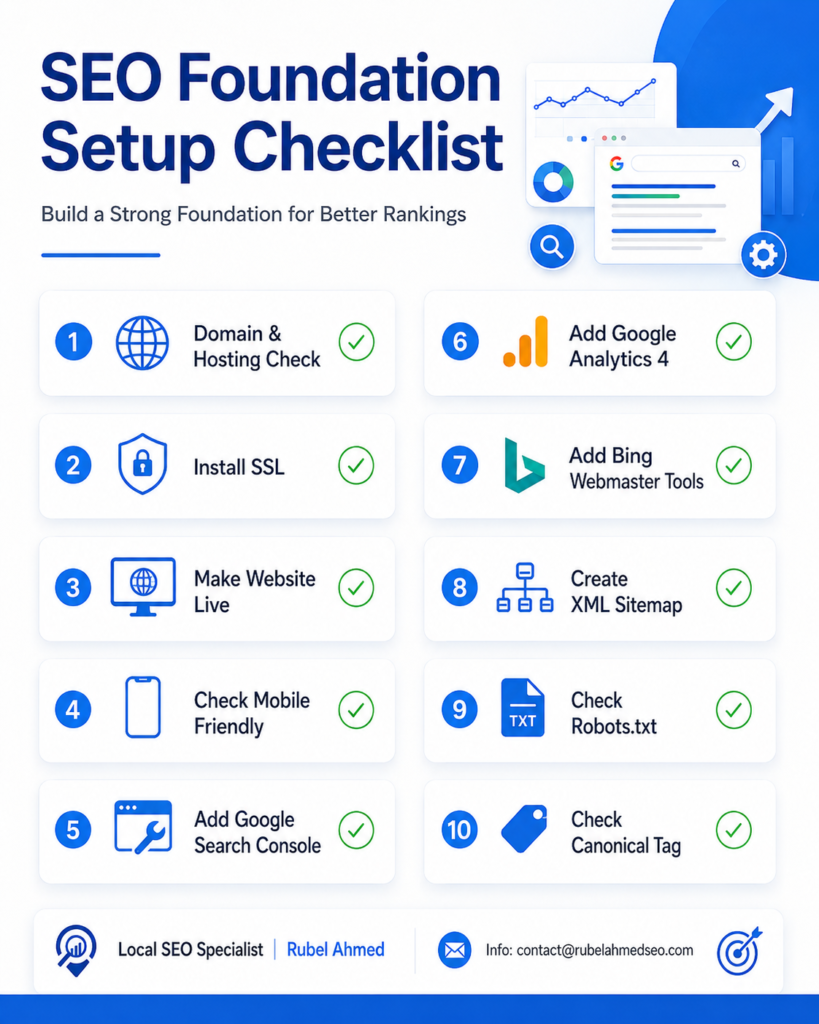
The SEO foundation setup checklist includes domain and hosting checks, SSL installation, mobile friendliness, Google Search Console, Google Analytics 4, Bing Webmaster Tools, XML sitemap, robots.txt review, and canonical tag setup. These steps may look basic, but they are essential.
A website that is technically ready has a better chance of getting indexed, ranked, and trusted by users. Whether you are launching a new website or improving an existing one, start with the foundation first.
If your website is not getting visibility on Google, the problem may not be your business. The problem may be your SEO setup.
For professional guidance, SEO audits, and local search growth strategies, connect with:
Local SEO Specialist | Rubel Ahmed
Helping businesses build stronger SEO foundations, improve local visibility, and turn search traffic into real leads.

I am Rubel Ahmed Professional SEO Expert & Consultant, I have a Experience Of Over 2 Years in Keyword Research,On Page Optimazation,Content Strategy.